Rack Mount Cable Modem, Part 2 (S34)
July 23, 2025 Leave a comment
My previous cable modem (see previous post) has been in operation for some time now. Apparently SB8200 modems are now approaching the age of incompatibility with Comcast/Xfinity so it is time to upgrade. As a bonus, the S34 also has a 2.5 GbE port for even faster speeds. Yes, I know UniFi has a cable modem available now, and it is cheaper than this. But this doesn’t live in their ecosystem.
Like before, this isn’t a step-by-step guide and assumes some knowledge and tool ownership.
Supplies:
- 1x Arris Surfboard S34 Modem
- 1x BUD Industries CH-14401 Aluminum Small Rack Mount Chassis – 19″ L x 8.12″ W x 1.75″ H
- 1x BUD Industries C-14431 Aluminum Small Rack Mount Ventilated Chassis Cover – 17″ L x 8″ W x 0.05″ H
- 1x MEANWELL RS-25-12 AC to DC Power Supply, Single Output – 12V, 2.1A, 25.2W
- 1x Black Box Panel Mount Modular Coupler (FMT1081 or FMT1020)
- OR 1x Black Box Panel Mount Bezel (FMT1000) and 1x RJ45 Keystone Jack
- 1x F Jack Female to Female Coupler
- 1x IEC Inlet – switched or not
- 1x 1′ Cat6 Cable
- 1x 1′ Coaxial Cable with F Connectors
- 1x 3D printed base plate
- 1x 3D printed light pipe
- Scotch Double Sided Mounting Tape
- Misc. wires and terminals for connecting IEC inlet to power supply
- Misc. supplies to secure wiring (self adhesive wire tie mounts, cable ties)
Tools:
- Misc. plastic case opening tools
- 2.50mm Drill Bit and M3 Tap
- Sheet Metal Nibbler
- Misc. other drill bits (1/8, 3/8, 1/2)
- Needle files – don’t go cheap but top of the line is needed either
- I used a drill press but the holes can easily be drilled by hand as well with some care.
How it all comes together:
The first step is to crack the modem open. These are surprisingly easy to get into compared to the SB8200. The two Phillips screws under rubber feet on the bottom need removed, then it’s ready to pry. No label removal this time – don’t be fooled by the depression in the center of the label, it’s not a screw.
Here are the screws:


Let’s take a look at a sides of the partially disassembled case:


You can see one side (the left when looking at it from the front) has nothing more than a seam but the other side (the right when looking at it from the front) has two tabs that need pushed to release. I gently squeezed the sides of the top half of the case until a plastic spudger would slip into the seam and I could gently pry the bottom catches out while pushing in the top tabs.
At this point, the only things holding the PCB into the bottom half of the case are the nut on the coax connector and one screw by the light guide.

This model uses three LEDs through a single guide. This is going to complicate things a bit since they are arranged front-to-back rather than side-by-side and easy to separate like in the SB8200. I suspect we’ll have to handle that with a single custom light guide to route it out to holes in the front panel. My goal is to re-use the SB8200 front panel design since I had them laser cut and have several on hand. Perhaps in a future version I’ll desolder these and move them out to individual indicators on the front panel if they are not bright enough through the 3D printed light guide.

The new case:
These steps are the same as before, so rather than duplicate that writeup, please go read through it.
This time, instead of using press-fit PEM standoff inserts, I opted for a 3D printed base plate. The thickness of the base plate plus screw bosses comes in at 9.50mm which is only .50mm less than the 10mm standoffs in the other version. This design uses two of the screw holes in the PCB and re-uses the case screws so no additional hardware is required. A small shelf supports the other end of the PCB because there are no mounting holes and the bottom heatsink blocks much of the space underneath. This edge is secured with a small strip of double sided mounting tape (3mm by 40mm). I included pockets on the bottom for two 30mm long by 3/4″ wide (mixing units because the tape is sold as 3/4″ wide) pieces of double sided mounting tape to keep it low in the enclosure.
It would likely be fine in PLA but I’m going to use ASA for it’s higher heat tolerance just to be safe.

Here is the final printed version showing the bosses and mounting tape pockets.


And to deal with the LED issue, a custom light guide to be 3D printed in transparent PETG. Future refinement may be necessary but this should move some light from the board to the openings.
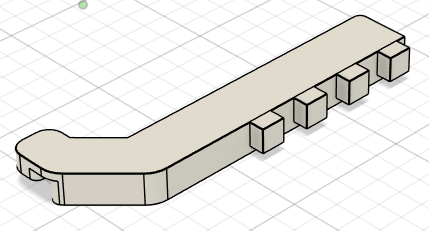
These photos show some light guide progression, moving from a design test in white PLA to transparent PETG at default settings then transparent PETG with refined settings. Though not optically clear, it is significantly more transparent. I’ve done enough testing now with the Bambu transparent PETG to know I won’t get much better finishes than this without significant tuning. This is probably worthy of a separate post, but here are the basics. First, I printed in white PLA to get a baseline for the model, test fitment, and refine the design since I have great success with PLA. Next, I printed with freshly opened transparent PETG using the default slicer settings for “0.16mm High Quality” using the default “Bambu PETG Transparent” filament profile to get a baseline for the material. This is shown on the bottom left below. From there, I followed the Bambu Lab guide for transparent PLA/PETG. This version is shown on the top right below. I then adjusted settings a bit more to change the solid infill pattern and ensure the infill direction aligned with the major axis of the part. Shown on the bottom right below and the series of three comparisons below. In those three, the optimized settings are shown on the top in all photos.


Here it is in place on the model and the real version. It sits over the edge of the base plate, offsets the base plate from the enclosure front panel, and ties all three pieces together.


Here it is installed both on the inside and outside as well as how it sits in an unfinished front panel.


Here are the files for the 3D printed parts: base plate and light guide. These are CC-BY-NC-SA licensed so commercial use is prohibited. If you improve upon these, please let me know so I can share your files here.
Different from the SB8200 version, this one will have a laser engraved front panel with the logo, model number, and maybe the MAC address. Marking the LED indicators isn’t needed since they are all routed through a single conduit for now, unlike the SB8200 which has separate LEDs for each function.
Here is the front panel fresh off the laser after a few coats of lacquer.


Putting it together:
The modem PCB dropped right into place and was screwed down on the left side and stuck to the mounting tape on the right side.
The light guide was snapped into place so the front panel could be screwed into place. 
And with the front panel in place.

The next step was to get it mounted in the rack and see how the light guide works.

When cycling through the colors on boot up and establishing connection, all of the colors are sufficiently visible. Blue is a bit dim but that is just fine because blue light on equipment tends to be quite harsh.


Just like with the SB8200 version, if you don’t want to build your own, you can order one from my store here. If you are unable to print your own, 3D printed parts are available from my store here. If you want a more comprehensive parts kit (everything but the modem and labor or some other combination), send me a message and I’ll put one together. I estimate a complete parts kit would be about $200 but this is subject to change based on inclusions and current costs.


